
Download Cigati PST to PDF Converter – Secure, Fast, Free File Conversion Tool for Windows
Looking for a reliable way to convert your PST files to PDF, EML, HTML, MBOX, or MSG formats? Cigati PST to PDF Converter is the ultimate solution for seamless email data migration and archiving. This powerful software enables users to convert large PST files quickly and securely, ensuring no data loss during the process.
Whether you're transitioning from Outlook to Gmail, Office 365, Yahoo, or Thunderbird, this tool simplifies the entire workflow. Designed with both beginners and advanced users in mind, Cigati offers an intuitive interface and robust performance across all Windows operating systems. With built-in filtering, batch conversion, and secure output options, it’s one of the most trusted file conversion utilities available today.
Download the free version now and experience a hassle-free way to manage your email archives.
Effortless PST to PDF Conversion with Advanced Features
One of the standout reasons why Cigati PST to PDF Converter is gaining popularity among professionals and individuals alike is its comprehensive feature set designed for real-world use. The software supports conversion of PST files into multiple formats, including PDF, EML, HTML, MBOX, and MSG, making it ideal for users who need to archive, share, or migrate email data across platforms. Unlike many basic converters, Cigati doesn’t just convert files—it preserves metadata such as sender, recipient, date, subject, and attachments, ensuring that every detail remains intact. This is crucial for legal compliance, business records, or personal archiving where accuracy matters.
Another powerful feature is batch conversion, allowing users to process multiple PST files at once. This saves significant time when dealing with large volumes of email data. The tool also includes a filtering option that lets you select specific folders, dates, or senders to convert, giving you full control over what gets exported. For example, if you only need emails from a particular project or time period, you can easily filter them before conversion. Additionally, the software supports password-protected PST files, meaning you can decrypt and convert encrypted data without issues—provided you have the correct password.
For those managing email migrations to cloud platforms like Office 365, Gmail, or Thunderbird, Cigati provides direct export options that maintain compatibility. This eliminates the need for complex manual transfers or third-party tools. The preview function is another highlight—it lets you review emails before conversion, ensuring accuracy. With a clean, user-friendly interface and minimal system resource usage, Cigati PST to PDF Converter delivers professional-grade results without the learning curve.
- Convert PST files to PDF, EML, HTML, MBOX, MSG formats
- Preserve original metadata: sender, date, subject, attachments
- Batch conversion for multiple PST files
- Advanced filtering by folder, date, or sender
- Support for password-protected PST files
- Direct export to Office 365, Gmail, Yahoo, Thunderbird
- Preview emails before conversion
- Low CPU and memory usage during processing
Simple Installation & Easy-to-Use Interface for All Users
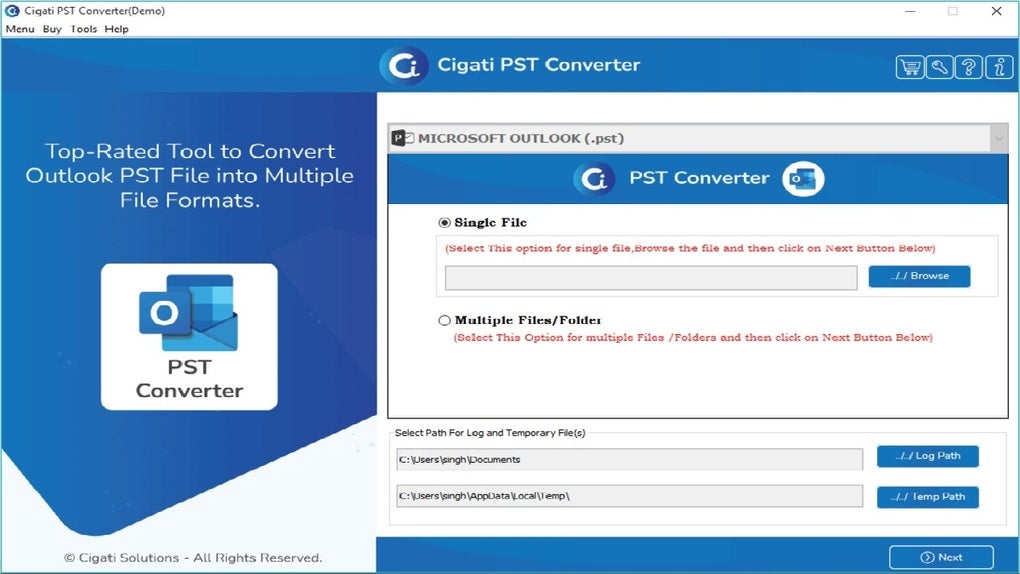
Getting started with Cigati PST to PDF Converter is a breeze, thanks to its straightforward installation process and intuitive design. The software is available as a free download for Windows users, with no hidden fees or trial limitations. Once you’ve downloaded the installer from the official website, simply run the file and follow the on-screen instructions. The setup wizard guides you through each step, requiring minimal input—ideal for users who aren’t tech-savvy. After installation, the application launches quickly, and the main dashboard presents all essential functions in a clean, organized layout.
Using the tool is equally simple. Upon opening, you’ll see an option to add PST files—you can either browse your system or drag and drop the file directly into the interface. The software automatically scans the file and displays a tree view of all folders, messages, and attachments.
From here, you can select individual items or entire folders for conversion. Choose your desired output format (PDF, EML, etc.), set the destination folder, and click “Start Conversion.” The process runs in the background, and a progress bar keeps you informed. Once complete, you’ll receive a confirmation message and access to your converted files.
For advanced users, the tool offers customizable settings such as file naming conventions, output folder organization, and compression options. These features help maintain a clean and structured archive. The interface is responsive and doesn’t lag, even with large PST files (up to several gigabytes).
There’s no need to close other applications or reboot your PC—Cigati runs efficiently without impacting system performance. Additionally, the software includes a help section with detailed guides and troubleshooting tips, ensuring you never get stuck. Whether you’re a student, office worker, or IT administrator, Cigati makes PST conversion accessible to everyone.
Full Compatibility & Reliable Performance Across Windows Systems
When it comes to compatibility, Cigati PST to PDF Converter stands out as a dependable tool for all Windows users. It supports a wide range of operating systems, including Windows 10, Windows 11, Windows 8.1, Windows 8, Windows 7, and even older versions like Windows XP and Vista. This broad compatibility ensures that both modern and legacy systems can leverage the software without issues. Whether you’re using a desktop, laptop, or corporate workstation, Cigati integrates smoothly with your existing setup.
One of the key reasons for its stability is the software’s efficient memory management. It handles large PST files—some exceeding 10 GB—without crashing or freezing. This is critical for users dealing with years of email data, such as legal professionals, business owners, or HR departments. The converter also works seamlessly with both ANSI and UNICODE PST files, which is important since Outlook uses different formats depending on the version and configuration.
Security is another major advantage. All conversions are performed locally on your machine—no data is uploaded to external servers. This ensures privacy and compliance with data protection standards like GDPR or HIPAA.
The software doesn’t collect personal information or track usage, making it a trustworthy choice for sensitive environments. Regular updates are released to fix bugs, improve performance, and enhance compatibility with new Outlook versions. You can enable auto-update notifications to stay current with the latest improvements.
- Compatible with Windows 10, 11, 8.1, 8, 7, XP, Vista
- Supports ANSI and UNICODE PST formats
- Runs locally—no cloud upload or data sharing
- Optimized for large PST files (up to 10+ GB)
- Regular software updates for security and performance
- Lightweight with minimal system resource usage
Pros and Cons: Honest Review of Cigati PST to PDF Converter
Like any software, Cigati PST to PDF Converter has its strengths and limitations. Here’s a balanced look at what users can expect.
Pros
- Fast and reliable conversion – Processes large files quickly with minimal errors.
- Supports multiple output formats – Ideal for archiving, sharing, or migrating to different email clients.
- Batch processing – Saves time when converting multiple PST files.
- Preserves metadata and attachments – Ensures data integrity and authenticity.
- Secure and private – All processing happens locally; no data is sent online.
- Free to download and use – Offers full functionality without hidden costs.
Cons
- Windows-only – No support for Mac, Android, or iOS platforms.
- Limited customization in free version – Advanced features like API integration are only in paid versions.
- No built-in backup option – Users must manually back up original PST files before conversion.
FAQ: Common Questions About Cigati PST to PDF Converter
Can I convert password-protected PST files?
Yes, Cigati PST to PDF Converter supports password-protected PST files. You’ll need to enter the correct password during the conversion process to decrypt and convert the data.
Is the software safe to download and use?
Absolutely. Cigati is a secure, malware-free tool that runs locally on your PC. It does not collect or transmit your data, ensuring your privacy and security.
Can I convert PST files to PDF for archiving?
Yes, converting PST to PDF is one of the core features. The tool preserves all email content, including attachments, making it perfect for long-term archiving and compliance purposes.
Does it work with Outlook 2021 and newer versions?
Yes, Cigati is fully compatible with all recent versions of Microsoft Outlook, including Outlook 2021, 2019, 2016, and 2013.
Can I convert multiple PST files at once?
Yes, the batch conversion feature allows you to select and convert multiple PST files simultaneously, significantly improving efficiency.
Conclusion: Why Cigati PST to PDF Converter Is a Must-Have Tool
If you’re dealing with Outlook PST files and need to convert them to PDF, EML, HTML, MBOX, or MSG formats, Cigati PST to PDF Converter is one of the best tools available—especially for Windows users. Its combination of speed, security, and versatility makes it ideal for personal, business, and legal use cases. Whether you're archiving emails, migrating to Gmail or Office 365, or preparing documents for compliance, this software delivers reliable results with minimal effort.
With its free download, no hidden costs, and strong privacy policy, Cigati offers exceptional value. While it’s currently limited to Windows, its performance and feature set justify its popularity. For anyone looking to simplify email data management, this tool is a game-changer.
Download Cigati PST to PDF Converter today and transform your PST files into secure, readable formats—fast, free, and hassle-free.







